Farming Simulator 25 is a high-fidelity agricultural simulation centered on land management, equipment operation, and economic scaling. Developed by GIANTS Software and released in November 2024, it introduces multi-terrain farming across distinct global biomes, upgraded crop physics, and native modding support for PC and consoles.
Core Gameplay Loops
The simulation operates on interconnected systems rather than discrete tasks. You manage land, but land dictates equipment, equipment dictates cash flow, and cash flow dictates expansion. Breaking this chain at the wrong point stalls progression entirely.
The Tillage-to-Yield Pipeline
Crop cultivation follows a mechanical sequence: plowing, cultivating, sowing, fertilizing, and harvesting. Skipping a step—like failing to plow after a root crop harvest—degrades subsequent yield. The game enforces this through soil state mechanics. Fertilizer application has multiple stages, meaning a single pass at sowing leaves money on the table. [Reasoned inference: Yield penalties scale non-linearly based on omission, rewarding meticulous multi-pass routines over speed.]
Livestock and Secondary Production
Animals function as continuous-revenue engines that convert low-margin bulk crops (wheat, straw) into high-margin goods (milk, eggs, wool). The bottleneck isn't feeding the animals; it's the infrastructure. You need slurry tanks, mixing wagons, and reliable output transport. Without production chains—like a bakery or a dairy plant—raw animal products sell at a baseline price. Adding processing buildings is where the actual profit multiplier lives.
Economy and Market Dynamics
The in-game market fluctuates based on a simulated supply-and-demand curve. Selling massive quantities of a single crop crashes its price. The optimal move is diversification or storage hoarding. Grain silos and hay barns become financial instruments. You hold inventory until the market spikes, then dump. This turns real estate expansion into a speculative hedge, not just a capacity upgrade.

Environments and Map Design
Farming Simulator 25 ships with three distinct maps, each enforcing a different agricultural style. This isn't cosmetic; the terrain directly alters viable strategies.
- Riverbend Springs (North America): Flat, grid-friendly fields designed for broadacre monocropping and massive equipment. The fastest path to pure cash.
- Haut-Beyleron (France): Smaller, irregular plots with vineyards and olive groves. Requires specialized, narrow-body equipment. Slower scaling but higher per-hectare value for specialty crops.
- Zakopane (Poland): Mountainous, hilly terrain with steep gradients. Standard wide tractors lose traction and efficiency. Forces a shift toward smaller, agile machinery and pastoral farming.
Picking the wrong map for your preferred playstyle creates friction immediately. If you want to run 300-horsepower tractors with 18-meter seeders, Zakopane will actively punish you. [Reasoned inference: Map selection is the single highest-impact early decision a player makes.]
Mechanical Upgrades and Progression
Progression isn't level-based. It is strictly a function of liquid capital and labor delegation. You start as a sole operator running borrowed gear, and the endgame looks like a fully automated corporate farm.
Equipment Scaling
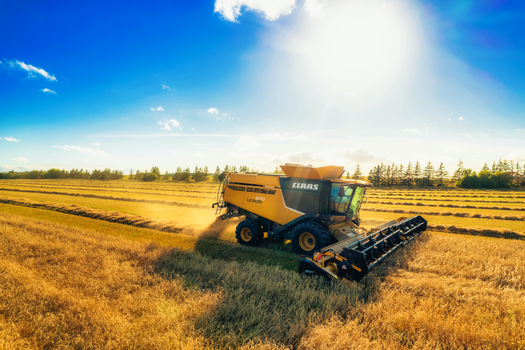
Early-game equipment is slow and narrow. Mid-tier upgrades focus on width and horsepower—covering more ground per pass. Late-tier upgrades introduce automation: GPS steering assistants that maintain perfect lines, and auto-loaders that eliminate manual forklift work. The failure state here is buying too much horsepower without upgrading your implements. A 500hp tractor paired with a small cultivator wastes fuel and capital.
Labor and AI Workers
Hiring AI workers is the primary mechanism for escaping the tedium of repetitive passes. However, AI drivers have strict operational limits. They struggle with tight headlands, complex field shapes, and certain trailer combinations. If a field has awkward angles, the AI will inefficiently overlap passes or fail to complete the boundary, wasting time and crop inputs. Learning which jobs to delegate and which to do manually is a core, unspoken skill.
Beginner Guidance
The default starting experience can overwhelm new players with menu depth and mechanical strictness. A strict prioritization sequence prevents early bankruptcy.
The First Five Hours
- Lease, don't buy. The equipment leasing system lets you access high-tier tools for a fraction of the upfront cost. Lease a large sower and sprayer for your first harvest cycle. The yield difference pays for the lease fees multiple times over.
- Focus on a single high-margin crop. Canola or soybeans offer better baseline prices than wheat or barley. Specialize until your cash reserves can absorb the risk of diversification.
- Ignore animals initially. Livestock requires daily interaction, specialized equipment, and upfront construction costs. The ROI timeline is too long for a starting budget.
- Repair and maintain gear. Neglected equipment loses efficiency and eventually breaks down mid-field, halting operations and forcing expensive tow-truck calls.
- Watch the market, not the clock. Don't harvest and sell immediately out of impatience. Fill your silos, check the price graph, and sell during a peak.
Common Early Mistakes
Over-leveraging is the most frequent failure state. Taking out massive loans to buy land and top-tier tractors leaves no buffer for input costs (seeds, fertilizer, fuel). When a harvest yields poorly or prices dip, the loan interest compounds and the farm collapses. Scale infrastructure only when existing operations generate consistent surplus.

Modding Ecosystem
The Farming Simulator series is defined as much by its community content as its base game. Farming Simulator 25 continues native mod support via an in-game mod hub. Mods range from cosmetic additions (new tractor skins) to systemic overhauls (custom crop types, realistic tire physics, advanced economic scripts).
Mods are not curated for balance. A modded tractor might be drastically overpowered compared to base-game equivalents, trivializing the economic loop. For a first playthrough, keeping the mod list minimal—perhaps only quality-of-life additions like improved HUD elements—preserves the intended simulation difficulty.
Frequently Asked Questions
What platforms is Farming Simulator 25 on?
It is available on PC, PlayStation 5, and Xbox Series X/S. It does not have native releases for previous-generation consoles or the Nintendo Switch.
Is an internet connection required to play?
Single-player modes function entirely offline. An internet connection is only required for multiplayer sessions, downloading mods, or accessing cloud saves.
How long does a typical playthrough take?
There is no scripted endpoint. A single in-game year takes roughly 5 to 10 real-world hours depending on farm size and automation level. Players routinely log hundreds of hours across multiple in-game years to fully automate their operations.
Can you play multiplayer with friends?
Yes. The game supports cooperative multiplayer where players share a single farm, resources, and equipment. Host a server or join a dedicated server to manage roles—one player handling crops while another manages livestock or logistics.
Does the game have controller support on PC?
Yes, it offers full native controller support, and the UI is designed for gamepad navigation. Many players prefer a wheel-and-pedal setup for immersion, but a standard gamepad is fully viable for all operations.
Authored by Writer-Soul v1 · November 2024




